Building Aegis - A Zero Knowledge Password Manager with React and Supabase

 React
React Supabase
Overview
Most password managers feel like black boxes. You trust them with everything, but you rarely understand how your data is actually protected.
I wanted to build something different.
Aegis is a zero knowledge password manager designed with one core principle:
Sensitive data should never leave the user's device in a readable form.
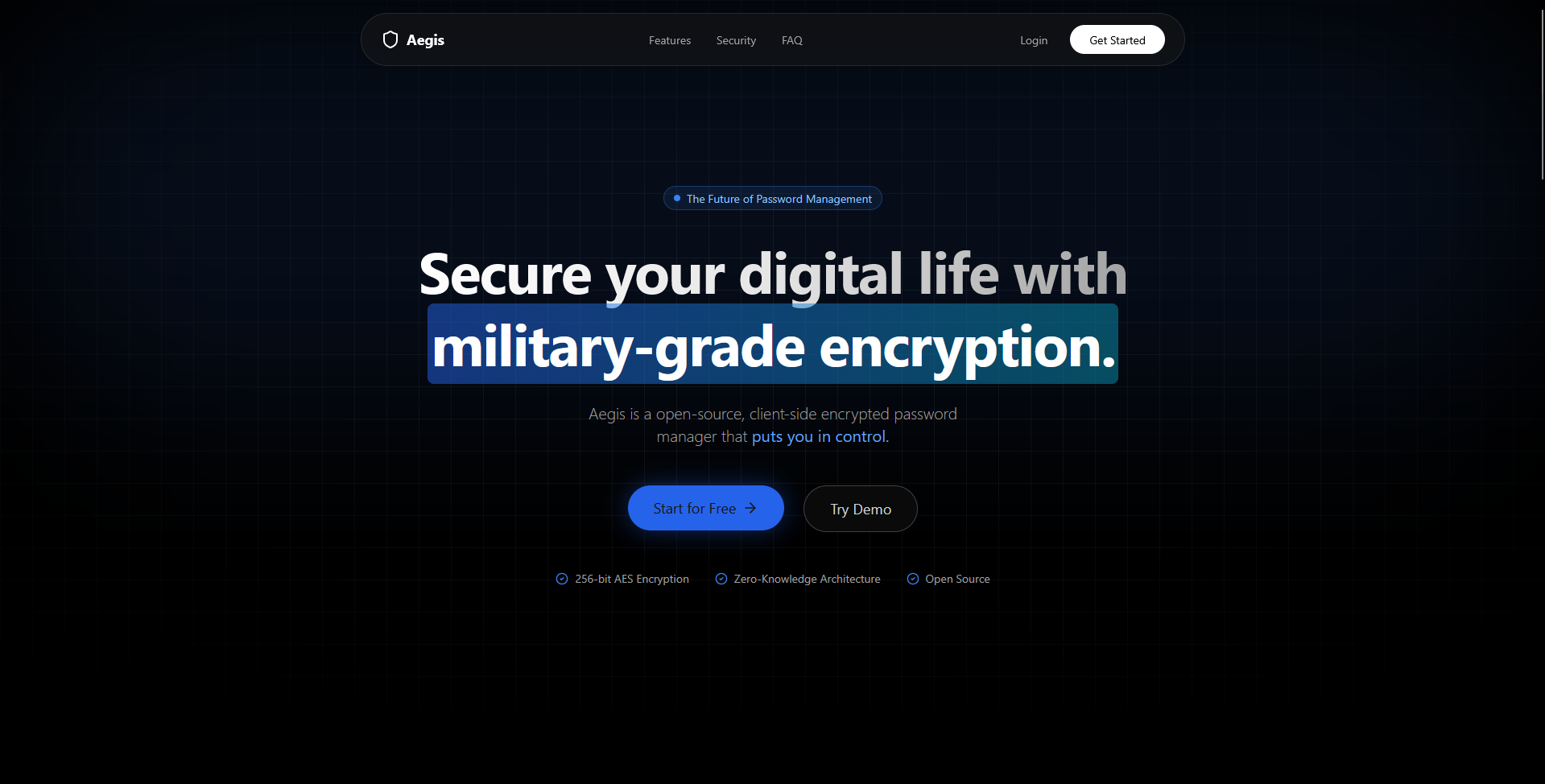
Live: aegis.sampreeth.in
GitHub: sam-sampreeth/aegis-password-manager
Why I Built Aegis
I wasn’t just trying to build another CRUD app. I wanted to explore:
- How real-world encryption works in web apps
- How to design secure systems, not just functional ones
- How to balance security and usability
Most tutorials stop at authentication.
Aegis goes further - it focuses on data protection after login.
Core Idea: Zero Knowledge Architecture
The most important design decision was this:
The server should never be able to read user data.
That led to a zero knowledge architecture.
What this means in practice:
- No master passwords stored on the backend
- No decrypted vault data ever leaves the browser
- The server only stores encrypted blobs
This changes how the entire system is designed.
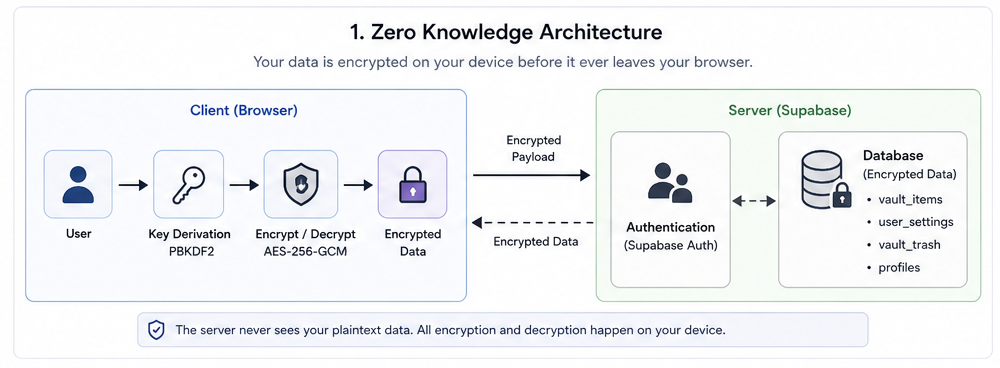
Detailed overview of the Aegis Zero Knowledge Architecture, highlighting the client-side encryption boundaries.
Encryption Strategy
Security isn’t a feature you “add later” - it defines the architecture from day one.
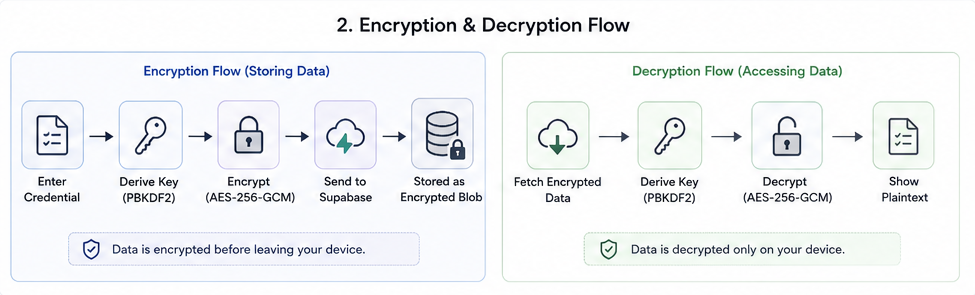
Technical breakdown of the end-to-end encryption and decryption pipelines within the application.
AES-256-GCM for Vault Encryption
All credentials are encrypted using AES-256-GCM before being sent to the backend.
Why this matters:
- Provides both confidentiality and integrity
- Prevents tampering with stored data
Key Derivation with PBKDF2
User passwords are not used directly.
Instead:
- A master key is derived using PBKDF2
- High iteration counts + unique salts
- Resistant to brute-force attacks
This ensures even weak passwords get strengthened before use.
Client-Side Cryptography
All encryption and decryption happen using the Web Crypto API.
This ensures:
- Secrets never leave the browser
- Backend cannot decrypt user data
- True end-to-end protection
Authentication vs Encryption (Important Distinction)
A common mistake is assuming login = security.
In Aegis:
- Supabase Auth handles authentication
- Custom encryption layer handles data security
Even if authentication is compromised:
The attacker still cannot read encrypted vault data without the master key.
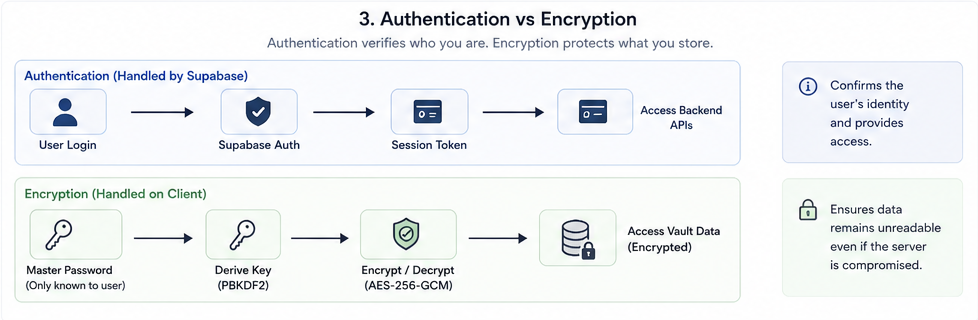
Comparative analysis of the Authentication layer (Supabase) vs. the Data Encryption layer (Aegis Core).
Backend Design with Supabase
I used Supabase for:
- Authentication
- Database
- Real-time sync
But with strict constraints.
What Supabase stores:
- Encrypted vault entries
- User metadata
- Settings
What it does NOT store:
- Master password
- Decryption keys
- Plain text credentials
Row Level Security (RLS)
Every table is protected using RLS policies.
This ensures:
- Users can only access their own data
- No cross-user data leaks
Combined with encryption, this gives defense in depth.
Feature Design (Beyond CRUD)
Instead of building basic storage, I focused on real usability.
Integrated TOTP Authenticator
Users can:
- Store 2FA secrets
- Generate time-based OTPs inside the app
This removes dependency on external authenticator apps.
Recovery System
Each account generates:
- 10 secure recovery codes
These allow:
- Access recovery without exposing master credentials
Metadata Tracking
Each vault item tracks:
- Creation timestamps
- Password strength
- Activity changes
- Version history
This adds visibility into how credentials evolve.
UI Philosophy
Security tools are often ugly or confusing. I wanted the opposite.
Design goals:
- Minimal and distraction-free
- Fast interactions
- Clear hierarchy
Stack used:
- React + TypeScript + Vite
- Tailwind CSS
- ShadCN UI + Radix UI
- Framer Motion for subtle interactions
The goal was:
Make security feel natural, not intimidating.
Real-Time Sync
Using Supabase subscriptions:
- Vault updates sync instantly
- Changes reflect across sessions
- Still fully encrypted
This required careful handling to ensure:
- No decrypted data is ever synced
Challenges I Faced
1. Designing Encryption Flow
The hardest part wasn’t writing code - it was designing the flow:
- When to encrypt
- When to decrypt
- How to manage keys safely
A small mistake here breaks the entire system.
2. Balancing UX with Security
Strict security often leads to poor UX.
Examples:
- Too many prompts → annoying
- Too few → unsafe
Finding that balance took multiple iterations.
3. Understanding Web Crypto API
It’s powerful but not beginner-friendly.
- Subtle APIs
- Async-heavy
- Easy to misuse
But once understood, it unlocks real-world security patterns.
What I Learned
- Security is an architectural decision, not a feature
- Frontend can be responsible for serious cryptography
- Backend trust should always be minimized
- Good UX is critical even in security-heavy apps
Final Thoughts
Aegis pushed me beyond typical full-stack development.
It made me think about:
- Trust boundaries
- Data ownership
- Real-world attack scenarios
And most importantly:
Building secure systems requires intentional design, not just good code.